Agentic AI,
explained plainly.
Agentic AI is the shift from asking one question at a time to giving an AI tool a job with several steps. The important question is not whether it sounds advanced. It is whether you have the rules, boundaries, and working habits around it.

The core idea
Four things that make AI agentic.
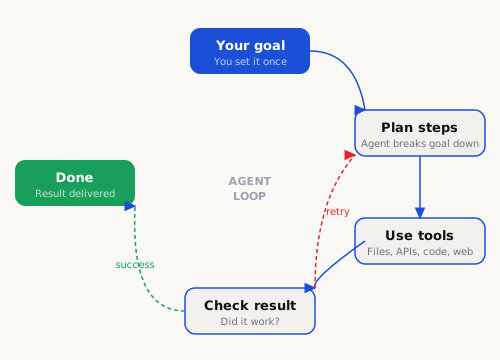
Regular chat AI answers one question at a time. An agent can do all four of these — which is what allows it to complete multi-step work without you in the loop for every step.
It can plan
Given a goal, it breaks the work into steps rather than treating each prompt as isolated. It can reconsider those steps as it learns more.
It can use tools
It can work with selected files, search for information, update documents, and use approved apps rather than only writing text back to you.
It can loop
It can try something, evaluate the result, adjust, and try again — without you prompting each iteration. This is what makes long tasks possible.
It can remember
With the right setup, an agent carries context across sessions — your conventions, your past decisions, your routing rules — so it does not start from zero each time.
What changes for you
From prompt-and-wait to give-and-receive.
The productivity gain is not another clever answer. It is repeatable work: a task can be described once, run in steps, checked, logged, and improved next time.
Chat AI (before)
- Prompt → read → copy → paste → prompt again
- You sequence every step manually
- Session resets — no memory of last time
- Stops when it runs out of space to respond
- Cannot touch your files or tools
Agentic AI (after)
- Give a goal, receive a completed result
- Agent handles sequencing and branching
- Persistent memory of your conventions
- Loops until the job is done
- Can read, write, search, build
The catch: agents work best when they have clear context about your setup, your conventions, and your guardrails upfront. That is exactly what Aksel generates.
Release definition
What Aksel is — and what it is not.
This is the important boundary. Aksel is not another AI chatbot and not a managed service. It is the starting point that makes an agentic setup easier to understand, safer to build, and easier to review.
Aksel gives you the operating foundation.
You answer a questionnaire. Aksel turns your answers into a local setup pack for your Mac: rules, privacy routing, working instructions, checklists, and agent context files.
- A self-serve blueprint kit
- A local operating manual for AI work
- A way to move from prompting to repeatable workflows
- A privacy-aware map of what should stay local
- A hosted AI platform
- A support contract or setup service
- A guarantee that your tools or models will work forever
- A system that runs, monitors, or controls your machine
Who it is useful for
Four first workflows that make sense.
Keep the first use cases simple. If people cannot imagine the first workflow, they will not buy the setup.

Draft, revise, publish — without the context-switching
Brief the agent on your product and tone once. Then ask it to draft a landing page, check it against your brand guide, revise based on your feedback, and write a launch email. The agent handles the sequencing. You handle the decisions.
Repurpose one piece of content into many formats
Upload a long-form article or transcript. The agent produces a Twitter thread, a LinkedIn post, a newsletter section, and a short-form video script — all matched to your voice. No per-platform prompting.
Automate recurring admin without writing code
Describe the task: every Monday, read the inbox summary, flag urgent items, draft a weekly status, and post it to Notion. The agent orchestrates this loop on a schedule. You approve or redirect as needed.
Run sensitive work locally — keep cloud out of the loop
Client contracts, personal finances, health data, or anything under NDA stays on your Mac. A local model (Ollama + Qwen or Llama) handles the sensitive prompts. Cloud models get only the non-sensitive tasks. Your routing rules make this explicit.
Ready?
Start by checking whether Aksel fits you.
If the fit is right, Aksel gives you the local operating foundation before you start giving agents more responsibility.